

Harnessing buying signals: How to reach out at the right time in B2B sales


B2B buying typically follows a journey from awareness through research and evaluation to purchase. At each stage, prospects emit different signals. Early signs might be subtle (like reading an industry blog), while later signals show real intent. Public events such as funding announcements, product launches or hiring sprees often indicate a prospect is gearing up to spend.
For example, if a SaaS company has just raised a Series A and is hiring account executives, budgets are opening and go-to-market tools are likely on the shopping list. Firmable’s verified signals flag these events in real time, helping sales teams engage the hottest opportunities first.
In a dynamic market, these signals give insight into buyer-intent tiers: from early awareness to late-stage purchase readiness. By capturing context-rich signals (such as a competitor change or a product launch), sales reps can tailor their approach to where a prospect really is.
As Forrester notes, modern B2B buyers continuously transmit signals through their behaviour and content consumption as they evaluate solutions. Recognising these patterns with Firmable’s data means you’re acting on insight, not guesswork.
Types of buying signals and what they tell you
Find timing triggers (funding rounds, fiscal year end, opportunity news).
Capital events often unlock budgets. A new funding round or an imminent budget cycle is a classic outreach trigger. Reach out with ROI-driven messaging just before the fiscal year end or right after a funding deal closes, when spending decisions are being made.
Spot new decision-makers (internal moves, executive hires, out-of-office returns).
Leadership changes can upend vendor choices. When a new executive or key stakeholder takes over, it’s a chance to reconnect. A quick congratulatory note to a newly promoted manager – or a “welcome back” message to someone returning from leave – can open doors to fresh conversations.
Target in-market accounts (review site intent, site visit patterns, third-party intent data).
Look for evidence of active research. Review platforms like G2 or Capterra show when prospects compare vendors. If a company’s team repeatedly views your product page or competitor profiles, they’re likely evaluating options. Tailor your outreach by referencing the category or content they’re exploring and share a relevant case study to grab their attention.
Leverage tech changes (tech added)
Technographic shifts don’t just flag rip-and-replace – they reveal where your product fits better together. When a prospect adds or standardises on a tool your product complements, it’s your cue to call with a clear integration win. Lead with the outcome, not the plumbing – faster time to value, cleaner data, tighter workflows.
Support account-based marketing (ABM) campaigns (lookalike ICP targeting, account segments, product-specific filters)
Use signals to refine your ABM lists. Firmable’s lookalike targeting finds accounts like your best customers, then filters them by live signals. For example, run a campaign to companies in a key sector that are hiring or recently funded. Pre-targeting such accounts before traditional intent cues appear helps your ABM efforts zero in on high-fit accounts already showing buying intent.
Tap into public visibility (news, social activity, events, mailers)
Public media creates hooks for outreach. If a prospect’s company hits the news or a contact posts on LinkedIn, use it in your message. Referencing an article or event the prospect is involved in shows you’re paying attention – and makes your message stand out.
Track financial readiness (financial reports, deal announcements)
Watch for signs of financial strength. Earnings releases or partnership news often mean the company has resources for new projects. Firmable’s Financial updates signal includes these events. After a strong quarter or a major deal win, reach out with solutions that can help them capitalise on their momentum.
Cheat sheet for pre-sales signals
Personnel move: your 90-day outbound opportunity
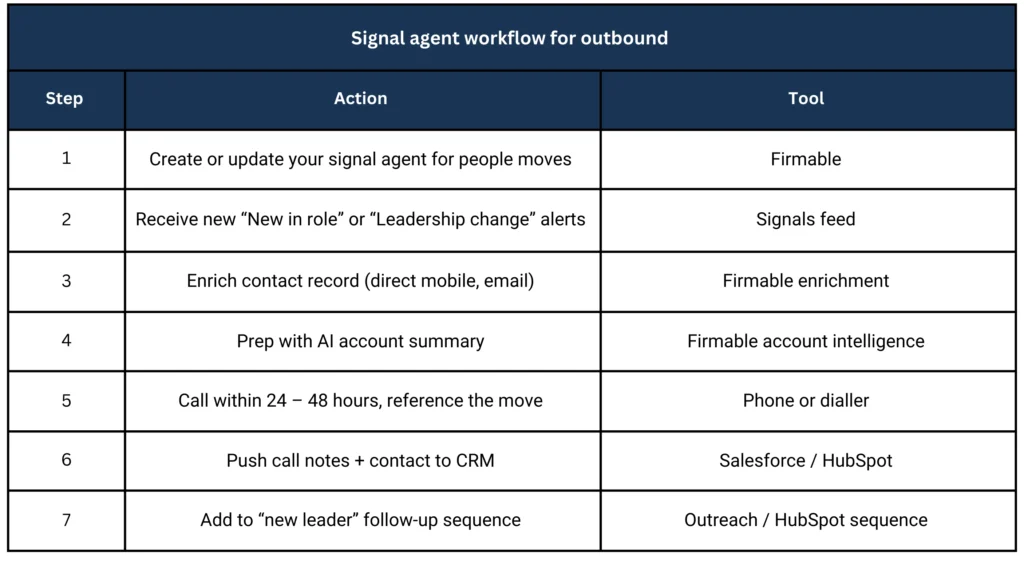
New leaders change things fast. In their first 90 days, they review what stays, what goes, and what gets upgraded – from people to platforms. That’s why personnel change signals are some of the highest-value triggers in Firmable. When a tracked contact takes on a new role, it’s a natural, warm entry point. They’re fielding congratulations and actively exploring new ideas. A well-timed call that connects to their fresh mandate can turn that “Congrats!” moment into a qualified conversation.
Signal type
People signal: New in role, Role change, or Left a role. These are automatically detected and surfaced through your signal agents across saved lists. Combine them with company-level signals like Leadership changes or Recruitment and hiring for broader coverage across accounts in motion.
How to set up your signal agent
1. Set up your list of companies or people you want to monitor. You can create a list if you haven’t already.
2. Navigate to the Signals module in the top menu bar.
3. Click + Create agent to set up a new Signal agent.
4. Enter an agent title to help you identify this agent later.
5. Select your preferred list(s) to monitor.
6. Choose the relevant people signals:
New in role: Person has started a new role at a new company.
Left a role: Person has left their current job.
Role change: Person has moved into a new role at the same company.
7. Click Create to finalise your Signal agent.
Once created, your Signal agent will begin monitoring for these changes, display results in your list, and notify you when a new signal is added.
Pro tip:
You can take action directly from the signal – call, push to CRM, or add to a prospecting list.
Job to be done
Act fast while they’re still setting direction. The goal isn’t to sell – it’s to start a relevant conversation that aligns to their first-quarter goals.
Your job:
- Spot new leaders and internal moves within your ICP accounts.
- Call within 24–48 hours of the signal.
- Lead with insight, not product. Mention one relevant shift in their market or function.
- Confirm ownership. Roles often move – update your CRM and sequences.
- Position value as a quick win, they can show early in the role.
Where to apply
- Call blocks: Start your daily power hour with “new in role” contacts.
- CRM filters: Create a saved view for Active personnel moves to feed your dialler.
- Sequences: Add a “Day-1” call step that triggers off the signal event.
- ABM plays: Combine phone and LinkedIn touches – call first, comment second.
- Pipeline reviews: Prioritise deals where the champion has moved roles.
Talk track examples
For new joiners
“Hey {{first name}}, congrats on the move! When new {{job title}} s start, they usually take a close look at current {{function}} tools. Curious if that’s on your list yet?”
For internal promotions
“Hi {{first name}}, saw you’ve stepped up into the {{new role}} role – congrats! Many teams use that moment to tighten up their {{process}} stack. Happy to share what’s working across similar orgs.”
For team hiring surges
“Hey {{first name}}, noticed you’re expanding the data team. That’s often the signal we see before a tooling refresh. Mind if I share a 2-minute example from another team that just scaled?”
Keep it casual, short, and contextual – you’re calling with purpose, not pitching cold.
Why this signal matters
- Timing: The 90-day window is when budgets and priorities reset.
- Access: You can reach decision-makers while they’re shaping their strategy.
- Context: You’re armed with verified, real-time data – not assumptions.
Conversion: Calls tied to personnel moves outperform generic cold calls 3-to-1 across Firmable customers.
Funding rounds – turn fresh capital into first conversations
New capital signals new priorities. After a funding round, leaders move quickly to hit growth targets – hiring, tooling, and go-to-market. It’s a natural moment to call, congratulate, and offer a fast path to value.
Signal Company signal – financial updates, product and business expansion
- Detects new capital events across your saved company lists.
Triggers to watch
- Verified sources – press releases, reputable media, investor sites.
Job to be done
Get a live conversation in the first 72 hours – align to where the funds will be deployed and propose a low-lift pilot. Your jobs:
- Call fast – same day if you can, within 24–72 hours at most.
- Lead with congrats and context – no pitch, one insight relevant to their scale goal.
- Qualify direction – headcount, markets, product, sales capacity, security, and data.
- Offer a quick win – a 2-week pilot that proves impact against a funded KPI.
- Map owners and timeline – confirm who signs and when budget phases unlock.
Where to apply
- Call lists – daily power hour starting with “new funding” accounts.
- Voicemail and SMS – short congrats and a single question if you miss.
- Executive assists – request an intro via EA for larger rounds.
- ABM support – light LinkedIn air-cover after your first call.
- CRM routing – tag “funding round” for attribution and next-step SLAs.
Talk tracks you can steal
- Congrats + direction
“{{First name}}, congrats on the {{round type}} – big milestone. Teams at this stage usually choose between hiring more reps or increasing conversion. Which lever is top priority this quarter?” - Pilot the KPI
“We helped another team right after their Series A lift meetings, held by 28 percent in four weeks. Open to a short pilot that proves the same before you scale spend?” - Owner and timing
“Who is leading the go-to-market work stream – you or {{peer}} – and when do you want this tested by? I can map a 2-week plan that fits your timeline.” - Keep it crisp – one insight, one question, one next step.
Signal agent setup – funding round
Go to Signals, then click + Create.
- Name your agent.
Use a clear, action-oriented name, e.g. “Funding – growth accounts”.
- Choose lists (choose the most relevant prospecting list)
Select up to five ICP lists you want to track.
- Add company filters.
Under Company filters, choose ‘Financial updates.’
1. Configure your signal criteria to create funding-related signals.
2. Under Summary, add the keywords you want the agent to track. e.g. “seed round, series A, raise.”
3. Under Recency, choose updates from the last 7 – 30 days to capture recent funding momentum.
4. Click Create. Your agent monitors selected accounts and surfaces timely updates.
5. Act from the feed.
6. Open a signal notification and take the next step – call, push to CRM, or add to a call list directly.
Pro tip:
Pair funding with Recruitment and hiring or a New C-suite appointment to find accounts that are staffing up and ready to buy.
Call flow checklist
1. Prep: Skim the announcement, investor notes, and AI account summary.
2. Dial: Congratulate, share one relevant insight, ask a single directional question.
3. Secure next step: 15-minute working session to scope a 2-week pilot.
4. Update CRM: Tag “funding round”, log owners, add to follow-up sequence.
5. Follow through: Send a brief agenda and calendar link immediately.
Metrics to watch
- Time to first call – target same day.
- Meeting rate on funding calls – benchmark against generic outbound.
- Pilot acceptance rate – aim ≥ 30 percent for Series A/B.
- Opps created and ACV – compare funded vs non-funded cohorts.
Pro tip:
For larger rounds, run an exec-to-exec call in week one – your CRO or founder to their growth lead – while your SDR keeps the thread moving with stakeholders.
Common mistakes to avoid
Acting too late: Signals are fleeting. If you delay outreach, competitors will jump in. Treat signals as urgent prompts, not casual leads.
Overreacting to every signal: Not all engagement means “ready to buy”. A newsletter click or blog visit is likely a research-stage signal. Use those for nurturing and focus sales pitches on higher-intent signals.
Blind automation: Alerts help you move fast, but don’t lose context. Ensure prospects fit your ideal profile and that outreach respects privacy rules. Firmable’s platform is built for privacy compliance. Automation speeds you up, but human judgment still wins.
Key takeaways
- Buying signals show real intent – act while they’re fresh.
- Use Firmable’s verified data to prioritise accounts showing genuine buying activity.
- Timing and context matter more than volume.
- Human judgment plus automation equals better conversations.
Conclusion
In today’s sales environment, success comes down to timing, context, and credibility. Signals give you the first two: Firmable helps with the third.
By integrating live buying signals into your daily workflow, your team can:
- Spot opportunity before competitors do.
- Reach decision-makers with context.
- Automate follow-ups directly in your CRM.
Stop chasing cold leads. Start connecting with warm, verified prospects at the right moment.
See how timely signals help you reach the right buyers at the right time.


The best AI sales stacks in APAC start with clean data, then scale with automation. This guide covers eight top AI sales tools for B2B teams in 2026, and how to combine them to improve targeting, timing, outreach, and conversion quality across the region.

Blog excerpt: AI voicebots are shaking up outbound sales in the US – but will ANZ buyers trust a synthetic voice? We break down what works (and what backfires), explore key compliance rules, and share why Firmable backs real reps, supported by smart signals.

Join the 2025 ANZ B2B Marketing Leaders Research. Share insights on people, process, and technology. Get early access to the report and a VIP launch invite.
